On these pages you will find everything you need to know when competing at the VEX Robotics UK National Championships. In previous years, teams have received Welcome Packs at the event containing this information but to save on paper waste, most of this information can now be found here. Printed match schedules will NOT be provided. Teams will need to use the VEX VIA app.
Further details including the risk assessment can be found on the Robot Events page for the Middle School Division here and for the High School Division here.
EYE PROTECTION IS MANDATORY - All Competitors will need to be wearing eye protection. Anyone not wearing eye protection will not be allowed by a Division Field, Skills Field or Practice Field.
Divisions
There are two VEX V5 Competition Divisions at the UK National Championships - one for Middle School and one for High School. This means that Middle School and High School teams will not compete against one another in either Tournament Matches or Skills Challenges. Each Division has it’s own Awards and Champions.
Inspection
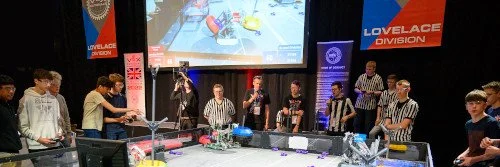
There is no separate Inspection area this year. High School teams will be inspected in the Lovelace Division, and Middle School teams will be inspected in the Brunel Division.
Student Centred Policy and Code of Conduct
The Robotics Education & Competition (REC) Foundation’s mission is to increase student interest and involvement in science, technology, engineering, and mathematics (STEM) by engaging students in hands-on, affordable, and sustainable robotics engineering programs. We believe that the student-centred model of learning is aligned with our mission and provides effective educational benefits to students. The REC Foundation Student-Centred Policy and Code of Conduct should reviewed by organisations participating in the UK National Championships. Violations of this policy could result in expulsion from the event.
Read the Student Centred Policy here.
Read the Code of Conduct here.
Read the Adult Behaviour Guidelines here.
Drivers Meeting
If you have a question that you would like to ask in the Drivers Meeting, please use this form to submit it. Please note that we may not be able to answer all questions, and any questions that can be answered by reading the game manual will not be considered.
Agenda
Note: Middle School and High School will have slightly different agendas
TBC soon.
Awards
The following awards will be judged over the course of the two days of the event:
| Excellence | Design * |
| Innovate ** | Think |
| Create | Build |
| Amaze | Judges |
| Sportsmanship | Energy |
There will also be trophies for the Tournament Champions and Robot Skills Champion, as well as some other special recognition awards.
Judges will be visiting the team in small groups during the two days. All communication to Judges questions should come from students.
* The Design Award requires a Digital submission via your RobotEvents account.
** The Innovate Award requires a Paper or Digital Submission to support. Refer to this link for further details.
Arriving at the Field
Help us to make matches run smoothly by using the following procedure when you arrive at the field for your matches:
All drive team members must be wearing safety glasses.
Arrive at the Field with both your Robot and Controller turned off.
Connect your Controller to the Smart Field Control System using the cable provided. Connect it to either of the Smart Ports (left or right) on the controller. Do not connect it to the central port on your Controller.
Place your Robot on the field and turn the Robot on.
Note: If using pneumatics they must be ready before placing the Robot on the Field per <T6> Once on the Field and positioned it can not be readjusted per <T12>
Turn on the Controller
Ensure the display on the Controllers are visible to the referees.
Wait for match to begin.
At the end of each match, wait for the referees signal to remove your robot and disconnect your Controller.
Matches
Teams will be playing one practice match each on the main fields in their Division.
There will then be numerous qualification matches per team over the 2 days, with only a few minutes between each match. As such, we will be needing teams to be aware of their schedule and the time to facilitate the event running on time.
Teams should be at the Queuing Table by the assigned field 5 to 10 minutes before the start of each match. If you are there and your Alliance partner is not, then send a representative of your team to find them!
Only three drive team members per team are allowed inside the Field area. No adults permitted inside the divisions.
All drive team members must wear safety glasses.
If you are not at the assigned competition field at the time your match is scheduled to start then you face being declared a ‘No Show’ and will not receive the points scored by your Alliance Partner.
V5 Smart Field Control
All Competition and Skills Fields at VEX UK Nationals will be using the V5 Smart Field Control system. Smart Field Control helps events to run more smoothly by giving teams more feedback about their robot status prior to a match. It will help to remind you to power up your robot, ensure that a program is running and make sure that you are on the correct Alliance for your match.
Please make sure that:
Your robot Brain and Controller firmware are on the latest version. These articles will help you if you are unsure:
Your Team Number is stored in your Brain exactly as written. For example, team 1234A should not be entered as 1234 A or 1234_A. This article will help you if you are unsure:
Skills Challenges
Teams are permitted to enter each of the Skills Challenges 3 times for a maximum of 6 total runs. Each team will have 3 Driver Skills, and 3 Autonomous Coding Skills runs.
All attempts are on a first come, first served basis. Simply go to the Skills Fields and register your interest with one of the referees. As soon as the Field is ready, you will be able to compete.
You must have your robot and controller with you in the queue.
Teams can only make one attempt and then must go to the back of the queue, unless there is no one waiting. In which case they may make another attempt once the Field is reset.
Final results and Awards for the Skills Challenge will be during the Awards Ceremony.
To help spread out the attempts a maximum of 3 Skills Runs can be made on Day Two of the event, meaning you must make at least 3 Skills Runs on Day One. However, you can make more if you wish on Day One.
The Skills Rankings screens will show you how many attempts you have made so far.
VEX Store
The following products are available to collect from UK Nationals. Orders must be placed on the VEX Robotics website, with “Collect from Warehouse” chosen as the shipping option to remove the carriage charge. Once the order is complete and you receive an order confirmation email you can collect from any VEX staff member.
Please note there are limited stock of all items on site.
Parts available on site:
276-4840 - V5 Smart Motor 11W
276-4842 - V5 Smart Motor 5.5W
276-4811 - V5 Battery
276-7100 – V5 System Bundle
276-4810 - V5 Robot Brain
276-4820 - V5 Controller
276-8750 - V5 Pneumatics Kit
276-8639 - V5 Assorted Pneumatic Fittings
276-5840/-5841/-5842 – V5 Motor Cartridges
228-6633 / 228-6634 – Silicone Bands
276-8076 / 276-8077 – EPDM Bands
276-2175 – VEX Safety Goggles
276-3938 - VRC Licence Plate Kit
276-4860 - Smart Cables (Short Assortment)
276-4861 - Smart Cables (Long Assortment)
Order and pay online at vexrobotics.com.
Pits Power and Battery Charging
The pit area will have one socket shared between two pits. Teams should bring 4-way adaptors and be prepared to share the main socket with the pit next to them.
Teams are responsible for ensuring they have charged batteries for their own robots at the start of matches.
Please ensure all of your batteries and chargers are labelled with your team's name and number.
Also, please remember to help out other teams, especially if they are on your Alliance, if they need assistance or to borrow equipment!
Livestream
The VEX Robotics UK National Championships will be live streamed. You can access these via the link below. Please share the livestream with friends, family and others that are unable to attend the event in person.